
Key Terms
This page collects the foundational terms used throughout the GalleonQL manual, along with short examples. It is the common foundation referenced by the other pages.
Environment (Connection Profile)
An environment bundles "which endpoint to connect to, and with what authentication and headers" into a single switchable connection profile. GalleonQL adopts the same orthogonal model as Postman: an environment is not an intermediate node in a hierarchy.
- Queries do not depend on the environment; they live inside collections.
- A request is assembled from "a query × the selected environment." Just by switching the environment in the top bar, you can change where the same query is sent — dev / stg / prod, and so on.
Example: environment
devpoints at the localhttp://localhost:4000/graphql, and environmentprodpoints athttps://api.example.com/graphql. You keep a single querygetUsersand switch its destination with the environment toggle.
Visually, an environment filter may make things look hierarchical, but as a data structure they are orthogonal (query and environment are separate axes). For details, see Registering and Switching Environments.
Environment Variables ({{...}})
Environment variables are the key-value pairs an environment holds. You insert them using the {{...}} form
into the value of an endpoint URL, a header, a GraphQL variable, and so on, and they are resolved to the actual
value of the selected environment at send time.
Example: define the environment variable
baseUrl = http://localhost:4000/graphqland write the request URL as{{baseUrl}}. When you switch environments, the contents of{{baseUrl}}are swapped. You can also definetokenand use it in theAuthorizationheader asBearer {{token}}.
Environment variables are a different thing from the "GraphQL variables" below. Do not confuse them.
To pull values from a response into environment variables after send, see Request hooks (extract and assert) (Pro).
GraphQL Variables ($id / $input)
GraphQL variables are the arguments of the GraphQL query itself. They begin with $, like $id or $input,
and you pass values when the query runs. They play a different role from an environment's {{...}} environment
variables.
Example: the
$idinuser(id: $id)is a GraphQL variable. It is a different mechanism frombaseUrlortoken(environment variables).
In the query builder, you can enter a field's arguments through a key-add UI and emit them into the generated
query in the field(name: value) form. In addition, when you switch the input mode to "Variables", top-level
arguments are replaced with $name named GraphQL variables and the builder generates query($name: Type){ … }
together with a variables (JSON) object; you enter the values in the variable matrix. For details, see
Query Builder.
Header Cascade
The headers for a request are determined by layering (cascading) in the order project-wide → environment → query-specific. If the same key appears, the lower (later) one overrides it.
Example: if you set
X-App: galleonqlproject-wide,Authorization: Bearer {{token}}at the environment level, andX-Trace: 1at the query level, the three merge into the final set of headers.
Before sending, you can preview the final headers, with {{token}} and the like resolved to the actual value
of the selected environment. For details of the cascade (including how authentication fits in), see
Registering and Switching Environments and
Sending Queries and Reading Responses.
HTTP Timeout Cascade
The connection timeout (the limit on waiting for the connection to be established) and the total timeout (the limit on waiting for the whole response) are determined the same way as headers: by layering them in the order app default → project → environment → query. A layer left empty is "unset" and inherits the value from above; a layer with a value overrides everything above it from that point on.
Example: if the project has nothing set (so it stays at the app defaults of 10s connect / 60s total), and only the slow
Stagingenvironment sets the total timeout to180seconds, every send that usesStaginggets a 180-second total timeout.
The connection timeout and the total timeout cascade independently of each other (overriding one does not affect the other). The allowed ranges are 1-60 seconds for connection and 1-600 seconds for total; zero and "unlimited" cannot be set. For the setup steps, see "Setting HTTP timeouts" and "HTTP timeout cascade" in Registering and Switching Environments.
Schema
A schema is the full set of type and field definitions that a GraphQL endpoint exposes. GalleonQL fetches it per environment (endpoint) via HTTP introspection and caches it locally. An imported schema can be browsed as a type catalog and becomes the foundation for the query builder.
For the import procedure, see Importing a Schema; for how to browse it, see Browsing the Schema Documentation.
Leaf and Branch
A field in the schema is classified as a leaf or a branch according to the kind of type it references. This distinction governs how you traverse the documentation and how you build a query.
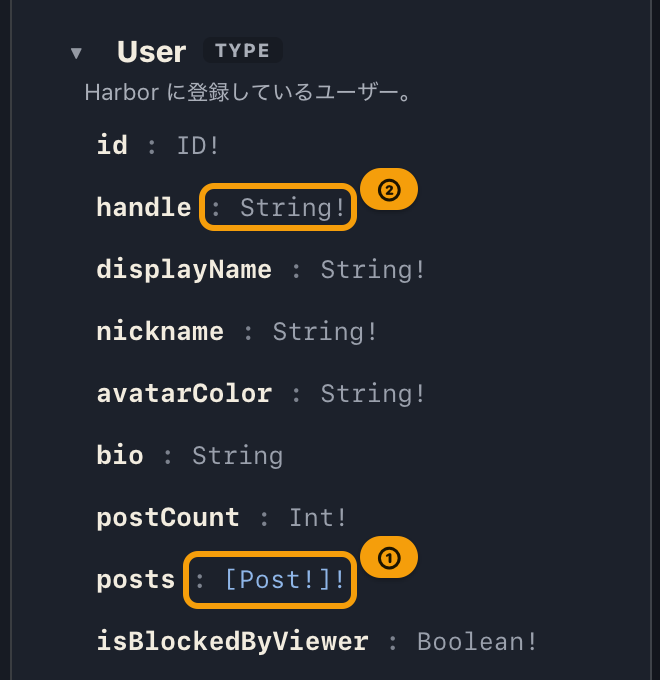
- Leaf: a field whose target is a scalar / enum. It cannot be expanded further.
- Branch: a field whose target is an object / interface / union. You can expand its inner fields further (add Child).
Example:
User.name(String) is a leaf.User.friends([User!]) is a branch, and you can expand its innernameand so on further.
add Query / add Child
add Query and add Child are the operations for building a query step by step, growing it branch by branch — you add new fields onto branches so you expand only what you need.
- add Query (
+ query): inserts a field of a root type (Query / Mutation / Subscription) from the type catalog as the root of the query. The main button always adds it with no children. - add Child (
+ child): expands one level of only the immediate scalars for an inserted branch.
Both are split buttons made of a main button and a ▼ menu. Choosing "Scalars only (one level)" or
"All fields (one level)" from ▼ overrides the granularity for that one time only (the fixed default does not
change). For detailed operation, see Query Builder.
Subscription
A subscription is the GraphQL operation for continuously receiving things that happen on the server. Unlike a query or mutation, which you send once and get one response, a subscription keeps adding results as events arrive while you stay subscribed.
GalleonQL connects over the transport chosen for the environment — WebSocket (upgrades to a dedicated
connection) or SSE (receives the response of a regular HTTP request as an event stream). The destination
is the environment's Subscription URL, which is derived from the request URL when left empty. Starting a
subscription turns the send button into ■ Stop, and received events stack up in the event list of the
response pane. Only one subscription runs at a time, only the most recent 1000 events are kept, and
GalleonQL does not reconnect automatically after a drop (all true regardless of transport).
For the full workflow, see Sending Queries.
Collection
A collection is a container (folder) for organizing queries (Query / Mutation / Subscription). Collections can be nested. They are designed so that they can, in the future, be handled in two tiers: a personal scope and a shared team scope.
Project
A project is the outermost unit that environments and collections belong to. When you switch projects with the top-bar selector, you switch to the environments and collections under that project. For per-project export and import, see Exporting / Importing Projects.
Plans (Free / Pro)
GalleonQL has two plans: Free ($0, unlimited projects) and Pro ($9.99 / month or $99 / year). Pro unlocks features such as request hooks, GraphQL subscriptions over WebSocket / SSE, and schema-diff confirmation on re-import. There is no project-count limit on either plan.
How you purchase and cancel depends on your OS. macOS (the Mac App Store build) uses Apple's in-app purchase; Windows and Linux use a Lemon Squeezy license key (see "License key" below). The plan itself (price, features) is the same everywhere.
For operations, see Plans (Free / Pro) and licenses.
License Key (a Windows / Linux term only)
A license key is the string you enter to apply Pro. This term applies only to the Windows / Linux build — it doesn't exist on the macOS (Mac App Store) build. On macOS, purchases are handled entirely by Apple's StoreKit, and no key ever changes hands (you use "Upgrade to Pro" and "Restore Purchases" instead).
For details, see Plans (Free / Pro) and licenses.
License Check at Startup (Automatically Applying a Subscription Lapse)
The license check at startup is a mechanism where, while you're on Pro, GalleonQL verifies your subscription every time the app starts. This automatically applies a subscription cancellation or lapse to the app at the next startup (it does not run on Free only). How the check works depends on your OS.
Windows / Linux (re-verifies the license key online):
- Valid (subscription active, or canceled but still within the paid period): Pro is kept as-is.
- Lapsed (expired, revoked, canceled and past the paid period, and so on): the app returns to Free and removes the license key from this device. Projects are not locked (Free still allows unlimited projects).
- Starting offline: a previously valid license is temporarily kept as long as it is within 24 hours of the last successful online check and still within its validity period, showing a "Cannot verify license" notice. Past that, you return to Free. Once you are back online, it is re-checked automatically.
macOS (asks StoreKit for your subscription status):
- Valid (subscribed, or canceled but still within the paid period): Pro is kept as-is. If you're not subscribed, you're on Free.
- If the check fails (for example, you're offline): your current state is kept as-is, showing a "Can't verify your license" notice. There's no Windows/Linux-style "fall back to Free after 24 hours" timer.
For details, see Plans (Free / Pro) and licenses.
Deactivating a License vs. Canceling a Subscription
Both give up paid Pro access, but billing and timing differ. Do not confuse them. This pair of actions belongs to the Windows / Linux build (since it's the one with a license key).
- Deactivating a license (Deactivate license on this device): immediately returns this device to Free and removes the key. However, billing does not stop.
- Canceling a subscription: stops billing. Pro remains until the end of the paid period, then returns to Free at a later app startup (via the license check at startup above).
The macOS build has no "deactivate" concept. Instead it has "Restore Purchases" (brings a purchase on this Apple Account to a new Mac) and "Manage Subscription" (cancel through the App Store app).
For details, see Plans (Free / Pro) and licenses.
Error Classification
GalleonQL classifies the errors that occur during import or sending by their cause and displays them accordingly. This helps you isolate the source of a problem.
- Network error: the server cannot be reached — connection failure, timeout, DNS / TLS problems, and so on.
- Authentication error: HTTP 401 / 403. Authentication is required, or the token is invalid.
- Client (query) error: HTTP 400 and the like — there is a problem on the request side (the URL or the query).
- Server error: HTTP 5xx and the like — there is a problem on the server side.
- Partial errors: only part of it failed. GraphQL can return
errors[]in the response even with an HTTP 200 (success).
For concrete handling of each classification, see Importing a Schema and Sending Queries and Reading Responses.
Request hooks (extract and assert)
Request hooks are declarative rules evaluated after a query is sent. They can extract values from the response into environment variables, or assert on status / body / env vars and record pass/fail on the response chip. There is no scripting. Pro plan only (Free can view existing rules).
For details, see Request hooks (extract and assert).
The full table of contents is reachable from the index.