
Registering and switching environments
This page explains how to register and switch between "environments (connection profiles)" that bundle the settings for each destination, and how to configure environment variables, authentication, and headers.
What an environment is: a connection profile (overview)
An environment is a switchable connection profile, equivalent to Postman's "Environment". It is not a parent (intermediate node) of collections or queries; it exists independently of queries (an orthogonal model). Queries are held under collections without depending on the environment, and sending and schema import are always assembled as "the target operation × the currently selected environment". For terminology, see Key terms.
Prerequisites
- The app is running (see Getting started (install and launch)).
- You understand the difference between an "environment variable" and a "GraphQL variable" (see the table below and Key terms). Confusing them leads to mistakes when setting headers and URLs.
The difference between environment variables and GraphQL variables (do not confuse them)
GalleonQL distinguishes two kinds of "variable". This page deals with environment variables.
| Environment variable (this page) | GraphQL variable | |
|---|---|---|
| Notation | Double curly braces, e.g. {{baseUrl}}, {{token}} |
Declared in the query, e.g. $id, $input |
| Owner | Held by the environment, as key-value pairs | Held by the query, as default values |
| Purpose | Connection settings that vary by environment, such as the destination URL | The query's arguments |
| Where they're inserted | Endpoint URL and header values | Arguments in the query body |
Named GraphQL variables (such as $id) become available when you switch the query builder's input mode to
"Variables" (see Query Builder).
Put authentication secrets (Bearer tokens, Basic passwords) in the "Auth" section described below, not in environment variables.
Steps
1. Open the environment editor
The top of the window carries the project and environment selectors, together with the resolved URL of the selected environment.


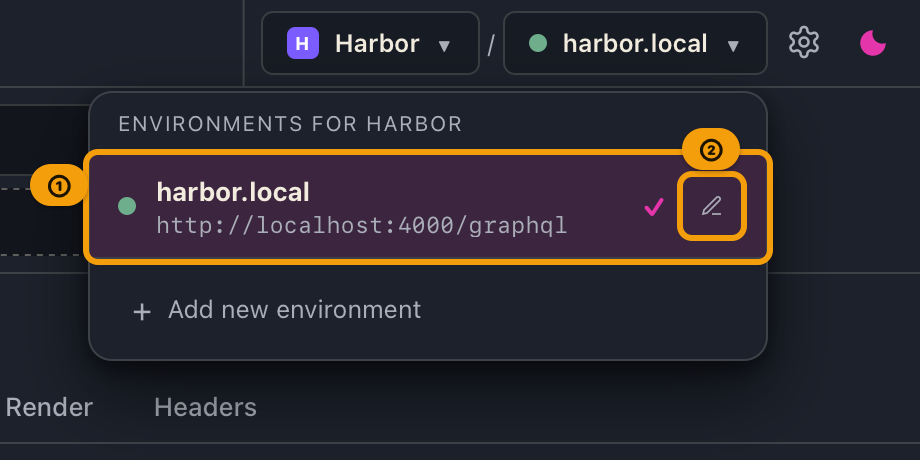
Clicking the environment selector lists that project's environments. Hovering a row reveals a pencil, and clicking it opens the environment editor for that environment. The "Edit environment" button in the explorer pane opens the editor for whichever environment is currently selected.
2. Add an environment
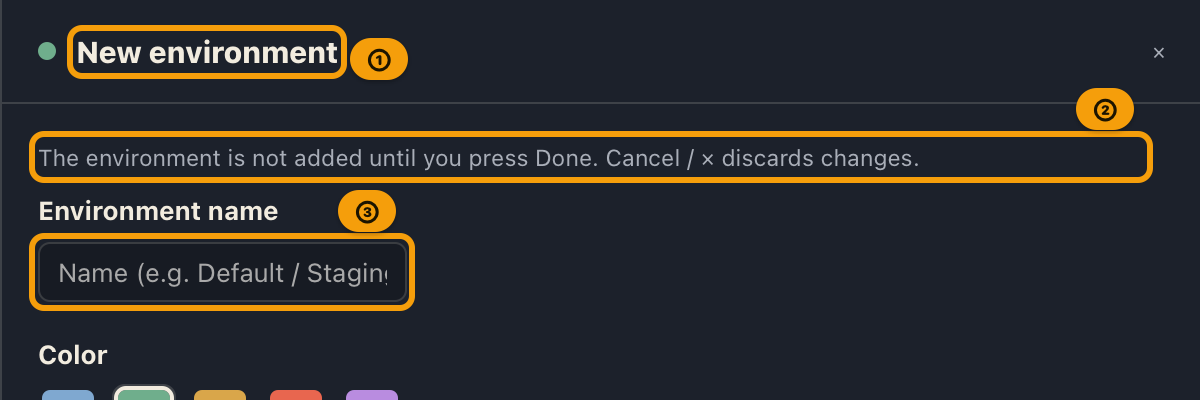
Open the environment selector on the top bar and press "+ Add new environment" below the list. The environment editor opens with the heading "New environment"; enter the environment name, the request URL, and anything else you need, then press "Done".
- Nothing is added until you press "Done". Closing with "Cancel", ×,
Esc, or a click on the dimmed area outside the editor discards what you entered. - The new environment is added to the project you have selected. Anything you leave blank stays empty (URL, environment variables, environment headers), and authentication is "None (none)".
- The new environment is selected as soon as it is added.
3. Set the request URL
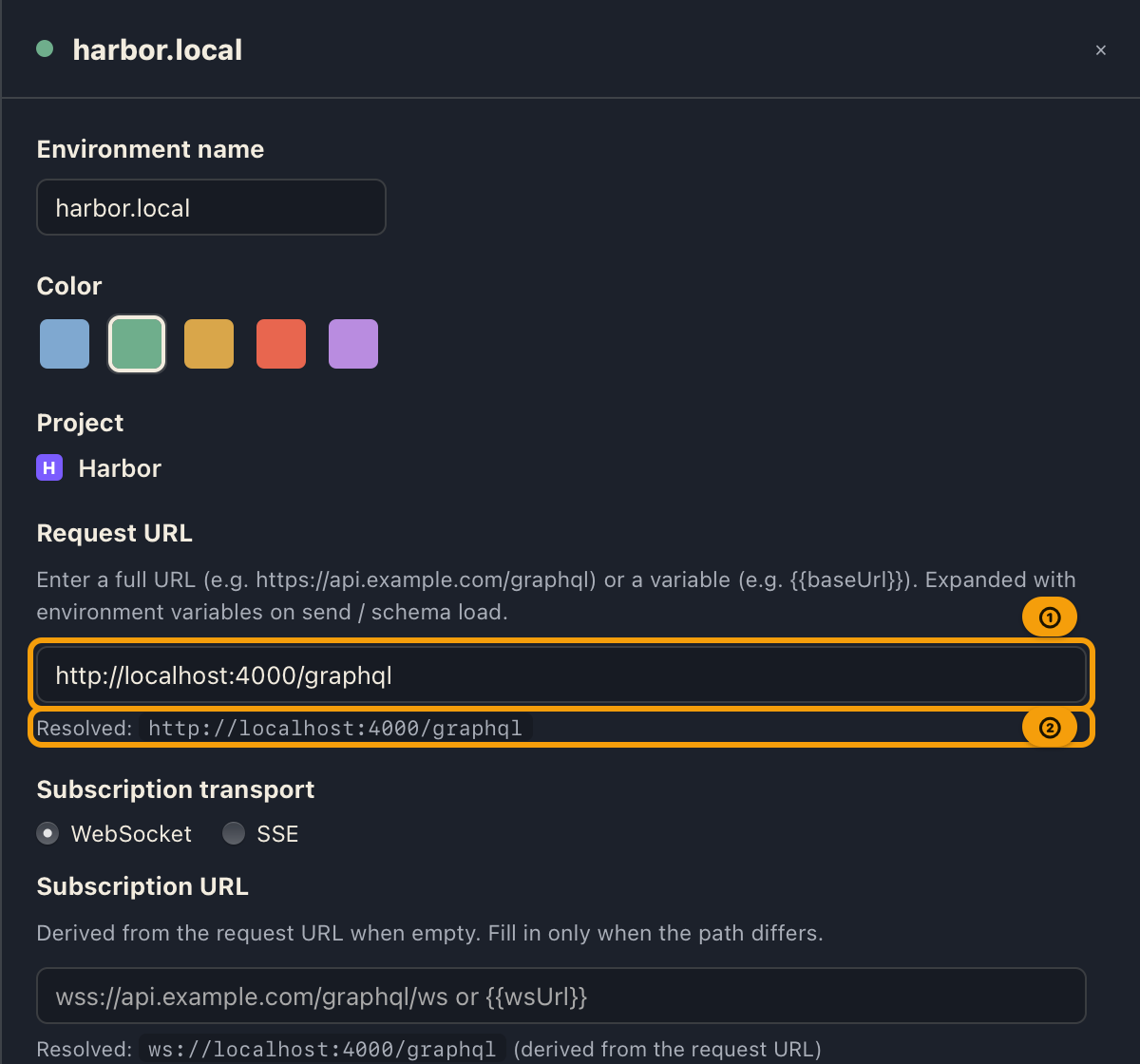
In the "Request URL" section, enter either a direct URL (e.g. https://api.example.com/graphql) or
reference an environment variable (e.g. {{baseUrl}}).
- A "Resolved: …" preview is shown below the input field. If any unresolved
{{...}}remain, a warning is shown. - The endpoint for sending and schema import uses the value of this request URL resolved with environment variables.
3-2. Set the subscription transport and destination
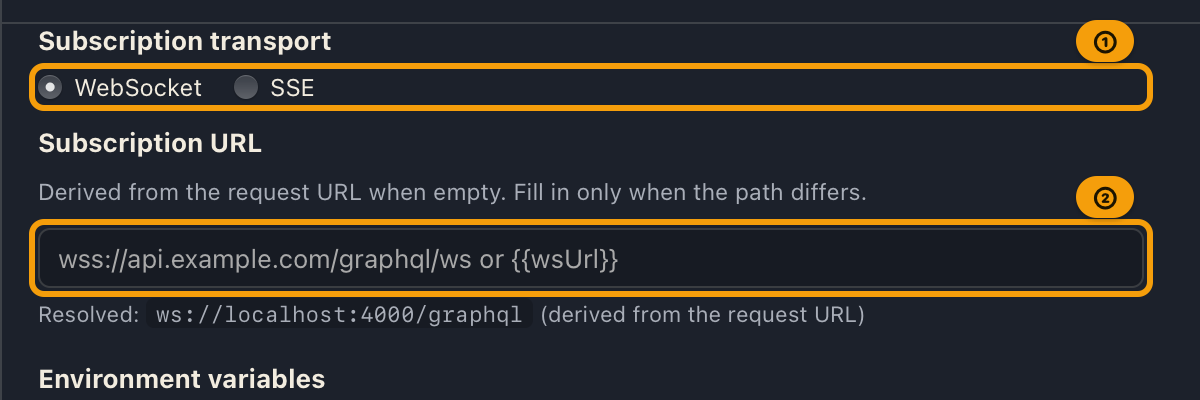
This is the connection method (transport) and destination GalleonQL uses when you subscribe. Choose
WebSocket or SSE using the radio buttons; the default is WebSocket. The URL field is optional, so
you can usually leave it empty. You can change the transport even on the Free plan (subscribing itself
requires the Pro plan — see Sending queries).
When the URL is empty, the request URL is reused, with only its scheme replaced according to the selected transport.
- With WebSocket selected:
https://api.example.com/graphqlbecomeswss://api.example.com/graphql(http://becomesws://). - With SSE selected: the scheme is not replaced (it stays
https:///http://, since SSE connects over plain HTTP).
The preview below the field shows "Resolved: … (derived from the request URL)".
- With WebSocket selected:
Fill it in only if the HTTP and subscription paths differ (for example
/graphqland, depending on the transport,/graphql/wsfor WebSocket or/graphql/streamfor SSE). The value you enter is used as-is; its scheme is not replaced.You can enter a direct URL or an environment variable reference (e.g.
{{wsUrl}}/{{sseUrl}}).If the destination cannot be determined, or the scheme you entered does not match the selected transport (for example writing
ws://while SSE is selected), the preview shows a warning explaining why. In that case, review this field or change the selected transport.
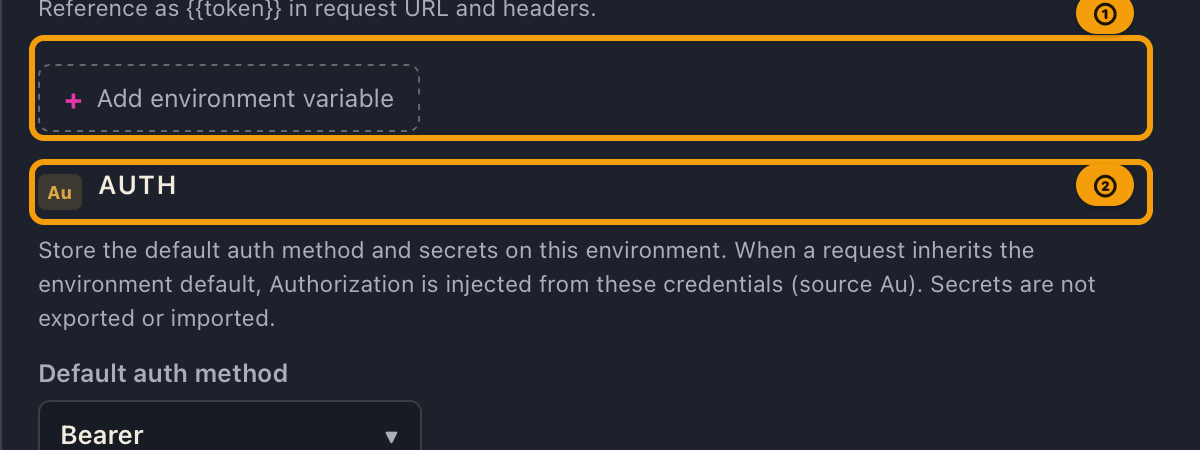
4. Add, edit, and delete environment variables
In the "Environment variables" section, enter a "Variable name" and a "Value," then click "Add environment variable".
- Editing the value field of an already-added variable, directly in the list, updates it immediately. Delete each row with "Delete".
- You can reference them as
{{key}}inside request URL and header values. They are resolved even when there is whitespace between the braces and the variable name, like{{ token }}. - Indirect references are resolved only one level deep (see "Limitations" below).
- Do not put authentication Bearer tokens or Basic passwords here (use the next "Auth" section).
- Besides manual edits, request hooks (post-send extract and assert; only extract overwrites variables) may overwrite variables without confirmation. If a value changes unexpectedly, check the Hooks tab results (Request hooks (extract and assert)).
Variable suggestions ({{ autocomplete)
In the value fields for URL, headers, and variables, typing one or more characters after {{ brings up a
list of candidates.
| Action | Result |
|---|---|
| Enter / Tab / click | Insert {{variableName}} |
| ↑ / ↓ | Move the highlight through candidates |
| Escape | Close the suggestions |
Each candidate starts with a badge:
| Badge | Meaning |
|---|---|
| P | Project-wide variable |
| E | Environment variable |
| A | App built-in (e.g. AppUserAgent) |
A P and an E with the same name appear on separate rows. On resolution, the environment side overrides the project. Suggestions do not appear in authentication secret fields (because auth values are not template-expanded).
5. Set authentication (default method and secrets)
In the "Auth" section (with the source badge Au to the left of the heading), set the default
authentication method and secrets for this environment.
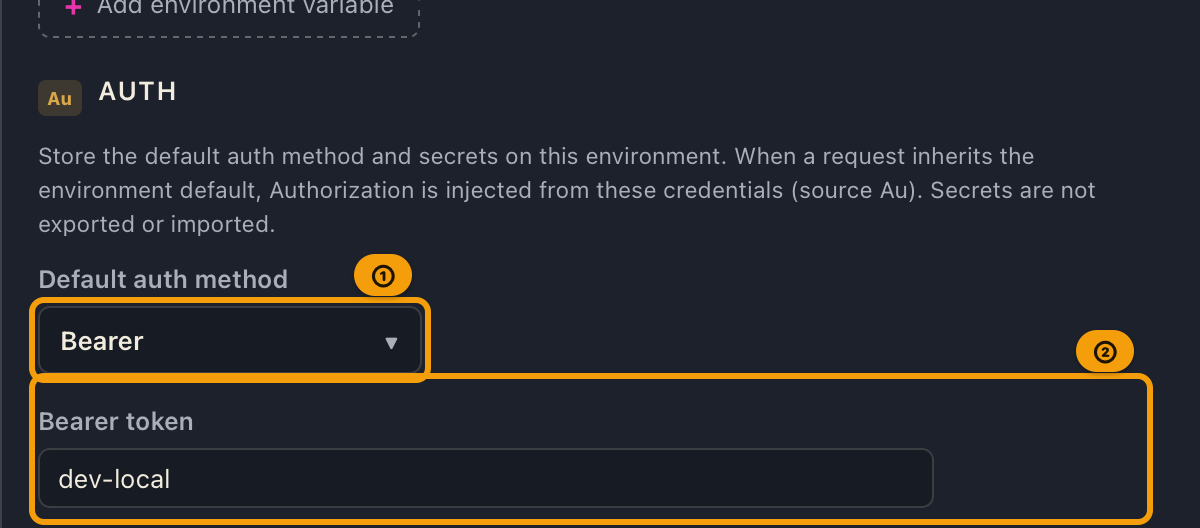
| Default auth method | Meaning | Secret fields shown |
|---|---|---|
| None (none) | Adds no auth header | None |
| Bearer | Builds Authorization: Bearer <token> |
Bearer token |
| Basic | Builds Authorization: Basic base64(username:password) |
Basic username / Basic password |
- When the request's Auth tab is "Inherit environment default",
Authorizationis automatically added using the method and secrets set here (sourceAu). Secrets are not exported/imported. - Auth values do not expand
{{...}}(by design, so secrets do not go through templates). Even if you write{{token}}in the token field, the literal string is used as is. - Bearer with an empty token does not send the
Authorizationheader at all. Basic with an empty password does send the header (encoded as an empty password; warning only).
| Situation | Warning text |
|---|---|
| Bearer with an empty token | Bearer token is empty. Enter a token in Auth or the environment auth settings. |
| Basic with an empty password | Basic password is empty. Confirm this is intentional. |
For how to override just the method on the request side, see the "Auth tab" in Sending queries and responses.
6. Add, edit, and delete environment request headers
In the "Environment request headers" section (source badge E), set HTTP headers that apply only to
this environment.
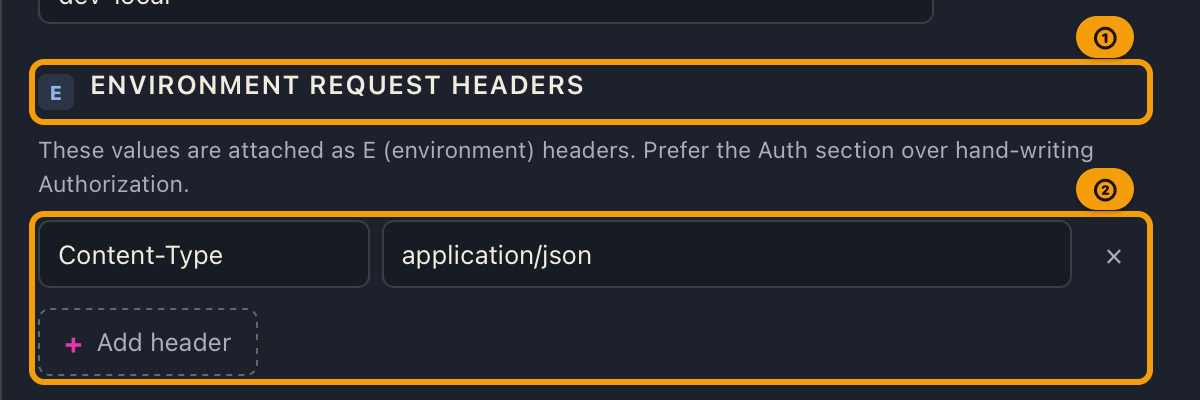
- Enter a "Header" and "Value," then click "Add header".
- You can insert environment variables into the value field, like
{{envVar}}(with{{suggestions). - Editing any field of an already-added row updates it immediately. Delete with "Delete".
- Hand-writing
Authorizationis discouraged (use the "Auth" section). Input itself is allowed for compatibility, but anAuthorizationwritten in an environment header is overridden by the later auth stage (Au) or request-specific headers (R) (see "Header cascade" below).
7. Setting HTTP timeouts
In the "HTTP timeouts" section (source badge E), set the connection timeout and total timeout for this
environment. The project editor drawer has the same section, which sets the default for the whole project.
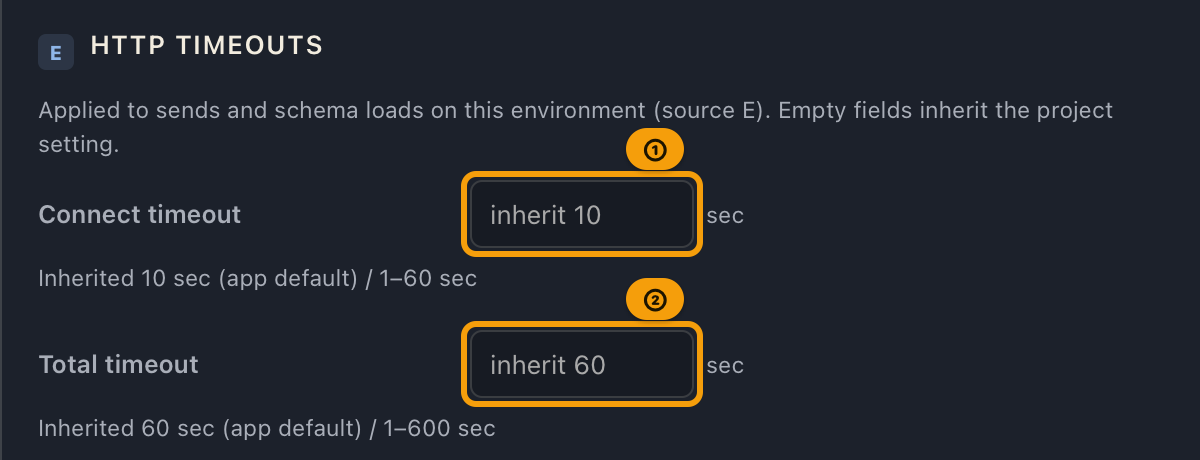
- Two fields are available: Connect timeout (default 10s, can be set from 1 to 60 seconds) and Total timeout (default 60s, can be set from 1 to 600 seconds).
- Leaving a field empty inherits the project's setting (or the app default if the project has none set either). While empty, the field shows the currently effective value, its source, and the allowed range, for example "Inherited 60 sec (project) / 1–600 sec".
- Full-width digits are normalized to half-width and saved (typing
10saves as10— this is not an error). Any non-digit character (decimal points, symbols, letters, etc.) is stripped out on the spot, with a "Digits only" notice — and whatever digits remain are saved as the number of seconds. For example, typing1.5strips the.and saves15seconds;10.5becomes105seconds. Entering what looks like a decimal does not get rejected or truncated — it is saved as a different whole number, so check the value that ends up in the field. The only error you can actually trigger from the UI is an out-of-range whole number (e.g. entering100for the connect timeout, which exceeds the 60s maximum); it is not clamped automatically and the previous valid value is kept. - Zero and "unlimited" cannot be set (this prevents the app from waiting indefinitely for a response that never arrives).
- The values set here apply to every query send and schema import that uses this environment (unless overridden per request on the Headers tab).
8. Rename an environment / delete an environment
- Changes to the "Environment name" field in the environment editor take effect immediately.
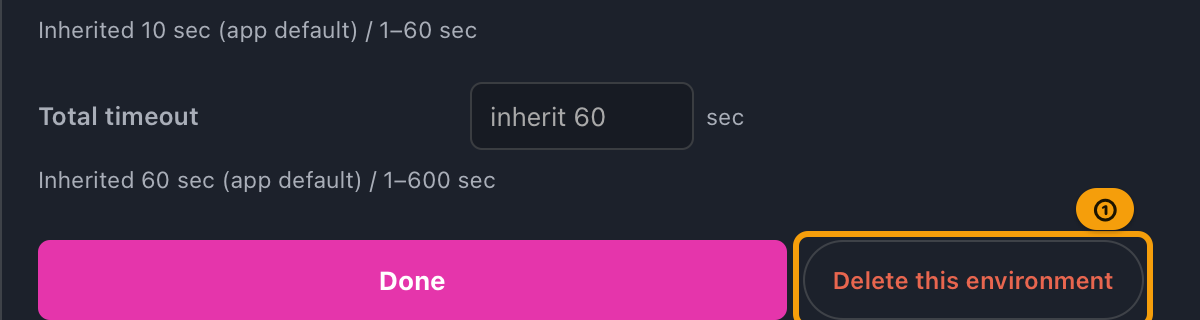
- To delete an environment, click "Delete this environment" at the bottom of the environment editor, then click "Delete" in the confirmation dialog. This can't be undone.
- You can delete them all down to 0 (though in that case schema import cannot be run).
- If you delete the currently selected environment, the first of the remaining environments is automatically selected.
9. Switch environments
Choosing a different environment in the top bar's environment selector immediately switches the resolved
URL, the final-header preview on the request pane's Headers tab, and the auth Authorization. When the
project has no environments, the selector shows "—" and its list says "No environments in this project".
Configuration examples
| Purpose | Environment name | Request URL | Environment variables | Authentication | Environment request headers |
|---|---|---|---|---|---|
| Local development (initial sample) | Default |
{{baseUrl}} |
baseUrl = http://localhost:4000/graphql |
Default method: Bearer, token dev-local |
Content-Type = application/json |
| Staging | Staging |
https://staging.example.com/graphql |
Optional | Default method: Bearer, an issued token | Optional |
| Basic auth API | BasicApi |
https://api.example.com/graphql |
Optional | Default method: Basic, username and password | Optional |
| Public API with no auth | Public |
https://countries.trevorblades.com/ |
Optional | None (none) | Optional |
HTTP timeout configuration example (extending only the total timeout for a slow staging environment):
| Layer | Connect timeout | Total timeout | Value actually used |
|---|---|---|---|
| Project | Empty (unset) | Empty (unset) | Connection 10s, total 60s (both app defaults) |
Environment Staging |
Empty (unset) | 180 |
Connection 10s (inherits app default), total 180s (overridden here) |
Header cascade (Project → Environment → Auth → Request)
The headers that get sent are merged in the following order, and for the same header name lower overrides upper.
- App built-in headers (
A; e.g.User-Agent) - Project-wide headers (
P) - Environment request headers (
E) - Authentication — the
Authorizationheader built from the method and secrets (Au) - Request-specific headers (
R)
- Priority: Request > Auth > Environment > Project > App.
- Header name matching is case-insensitive (
content-typeandContent-Typeare folded into one as the same header, and the final display name matches whichever side wins). - The request pane's Headers tab shows a "Final headers to send" preview, displaying the key, the resolved value, and the source badge. This preview is the same resolution result as the actual send (Sending queries and responses).
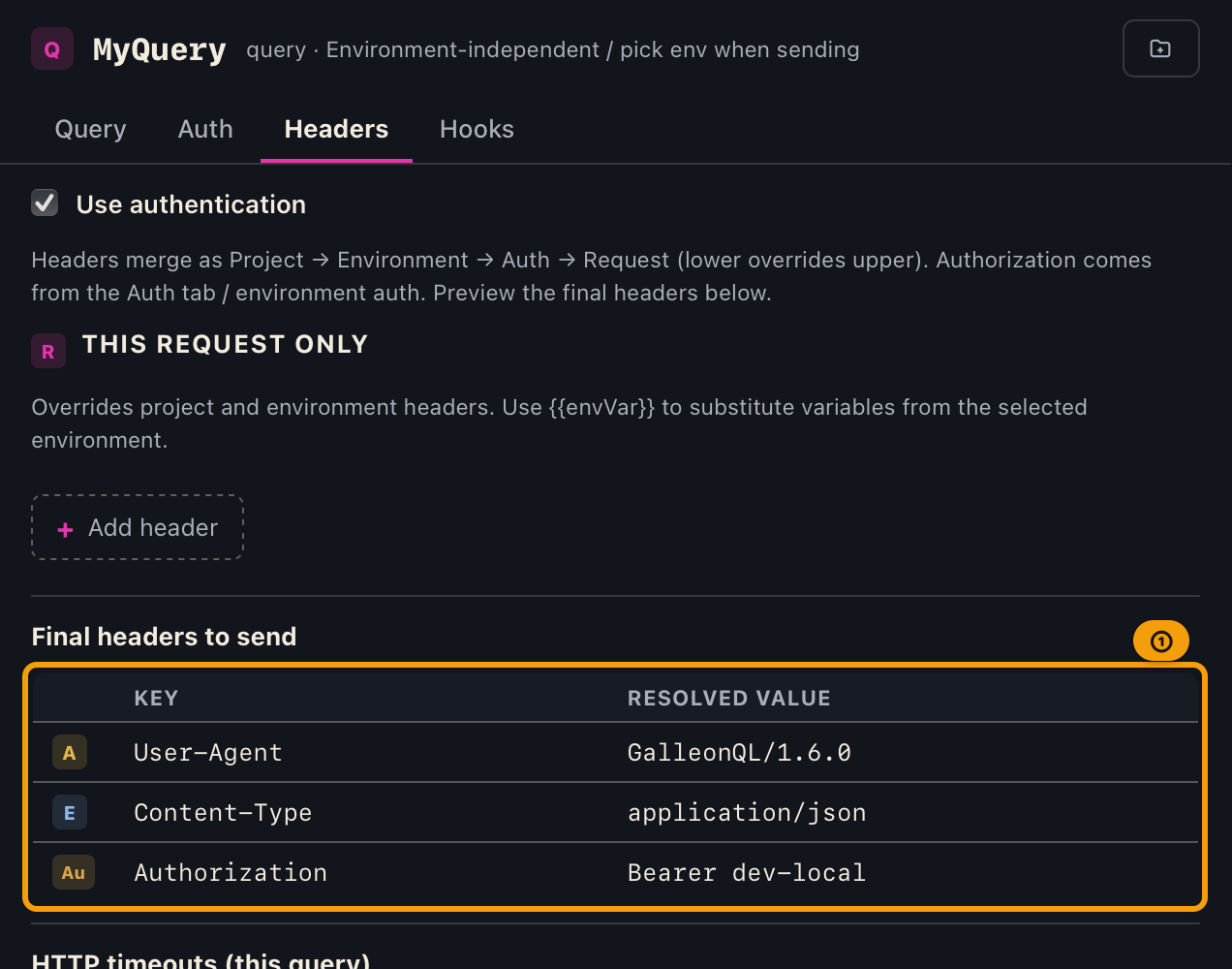
| Source badge | Meaning |
|---|---|
| A | App settings |
| P | Project settings |
| E | Environment settings |
| Au | Authentication |
| R | Request settings |
HTTP timeout cascade (App default → Project → Environment → Query)
HTTP timeouts (connection / total) are resolved by the same rule as headers: "layer them from the top, and the most specific layer with a value wins."
- App default (10s connect / 60s total)
- Project (the "HTTP timeouts" section in the project editor drawer)
- Environment (the "Setting HTTP timeouts" section on this page)
- Query (the "HTTP timeouts (this query)" section on the Headers tab of the request pane. See Sending queries and responses)
The difference from the header cascade is that timeouts have no auth stage, and the connection timeout and the total timeout cascade completely independently. For example, extending only the total timeout in an environment leaves the connection timeout unchanged (it stays at the project's setting, or the 10s default).
When a field is empty, the effective value, source, and allowed range up to the next layer above are shown as "Inherited N seconds (source) / min–max sec", so you can see what value is actually in effect without entering anything.
Schema import (introspection) has no query layer, so it is resolved through only three layers: app default → project → environment (see Importing a schema).
Persistence and restore
Environments (name, environment variables, environment headers, auth method and secrets) and the last selected environment are auto-saved to the device on every add / edit / delete / switch. No "Save" action is needed. When you restart the app, the registered environment list and the last selected environment are restored as they were. This restore issues no HTTP at all.
- On the first launch (when no environment is saved at all), one sample environment "Default" (the first row
of the configuration examples above, including the Bearer token
dev-local) is created automatically. - When you switch environments and the resolved URL changes, that URL's schema cache is loaded automatically, and the displayed schema and Query Builder switch to that URL's (no HTTP is issued). If it is a URL you have not imported yet, the schema you were looking at stays on screen within the same project (the "Not loaded yet" notice appears only when no schema is being shown; see "Cache Behavior" in Importing a schema for the exact conditions). To fetch the schema of a new endpoint, run "⟳ Load" (or "⟳ Reload") again after switching (Importing a schema).
🚨 Auth tokens and the like are stored unencrypted
Authentication secrets (Bearer tokens, Basic passwords) and the values of environment variables and environment headers are stored in plaintext on the device, unencrypted. The app data lives in the OS's user area and cannot be read by other OS users, but the fact that plaintext remains on disk does not change. This is an intentional decision; similar local tools such as Postman and Insomnia also store in plaintext. Keep this in mind when entering tokens and passwords.
Current limitations
- The auth methods are None (none) / Bearer / Basic / OAuth2 Client Credentials (all complete with the
Authorizationheader). API Key, OAuth2 Authorization Code, and custom-header authentication are not supported. - Auth values are not resolved with environment variables (
{{...}}). - Indirect references of environment variables are resolved only one level deep. For example, even if the
value of
apiHostis another variable reference{{host}}, it does not automatically chase down tohost(an intentional constraint to prevent infinite loops). In this case{{host}}remains after substitution and is warned about as unresolved. If you need multiple levels, expand the referenced value directly and register it. - Hand-writing
Authorizationis discouraged (use the "Auth" section).
When things go wrong
| Symptom | Likely cause | What to do |
|---|---|---|
| The environment selector shows "—" and its list says "No environments in this project" | The project has no environments | Add one with "+ Add new environment" below the list |
{{baseUrl}} appears literally in the URL with "Unresolved variables: baseUrl" |
The referenced environment variable isn't defined | Add the variable, or rewrite it as a direct URL |
| The final header shows "Unresolved variables: |
The header value's variable is undefined, or its reference chains through two or more levels | Add the missing variable, or flatten the reference to just one level |
| The warning bar at the top shows "Unresolved variables (query body / variables): |
A {{...}} in the query body or a GraphQL variable value refers to an environment variable that isn't defined |
Add the variable, or write the value directly |
| "Bearer token is empty. …" appears | The method is Bearer, but no token has been entered | Enter a token in the "Auth" section |
Authorization does not appear in the final headers |
The method is "None," or it's Bearer with an empty token | Check the "Auth" section and the request's Auth tab |
| The schema does not change even after switching environments | The resolved URL is the same before and after the switch, or the new URL hasn't been imported yet (within a project, the displayed schema is kept) | This is expected. If it hasn't been imported yet, run "⟳ Load" after switching |
| After switching, the schema disappeared and shows "Not loaded yet" | You switched projects, or the previous import failed, and the new URL hasn't been imported yet | This is expected — schemas aren't fetched automatically. Run "⟳ Load" |
| After restart only the sample "Default" remains | Your saved data was corrupted, or the app fell back after a database error | Check the warning shown just below the top bar. Recreate the environments if needed |
| The "HTTP timeouts" field shows an error notice and the value is not applied | You entered an out-of-range whole number (outside 1-60s for connect, 1-600s for total — the only error reachable from the UI) | Enter a whole number within range, or clear the field to inherit the layer above |
You typed something with a decimal point, like 1.5, and it was saved as an unexpected number of seconds (e.g. 15) |
By design: any non-digit character (including .) is stripped on the spot, and the remaining digits are saved as-is (this is not an error) |
If you see the "Digits only" notice, clear the field and re-enter a whole number of seconds |
| Sending or importing fails almost immediately with "timed out" | The target server is slow, or the total timeout is too short | Extend the total timeout in the project's or environment's "HTTP timeouts" section (up to 600s) |
Related documents
- How environments are used in schema import: Importing a schema
- The request's Auth tab, and how Authorization is built when sending: Sending queries and responses
- Post-send extract and assert (request hooks): Request hooks (extract and assert)
- Assembling queries: Query Builder
- Reordering environments: Reordering and moving
- Terminology: Key terms
- Back to the index: User manual contents