
Sending queries and responses
This page explains how to send an assembled query over HTTP and review the response and the error classification.
Overview
Sending is done as "the assembled query × the currently selected environment". Because HTTP communication is issued from the device side (GalleonQL itself), it is not subject to the browser's CORS restrictions. Even an internal API that a front end cannot access directly can be sent to, as long as GalleonQL's desktop process can reach it. You review the response by switching tabs, and errors are classified and shown by their cause. For terminology, see Key terms.
Prerequisites
- The destination environment is selected, and its resolved URL is determined — you can't send while
unresolved
{{...}}remain (see Registering and switching environments). - You have added one or more root fields in the Query Builder (you cannot send while there are 0).
- Schema import is not a prerequisite for sending (the top bar's send button and the response area are shown even without an import). However, assembling a query does require an import (Importing a schema).
Where it is on screen
The screen has three areas: the left panel, request, and response (Overview and Features). The request pane's tabs are Query | Auth | Headers | Hooks. The controls for sending are here:
- HTTP method: at the left end of the top bar (left of the resolved URL).
▶ Send: in two places — right next to the resolved URL on the top bar, and in the Query Builder header on the request pane's Query tab (right of the input mode toggle). Both send the same request. Before anything has been sent, the same button also appears in the empty response pane.- Status (HTTP status, elapsed time, and so on): in one place only — the header line of the response pane (level
with the request pane's header, above the tab row). While sending,
Sending...appears both on the send button and on this line.
The response is shown in the response pane. Hooks run after send to extract values into environment variables or assert on the response (Request hooks (extract and assert); Pro).
Steps
1. Prepare an environment and a query
- Choose the destination environment in the top bar's environment selector, and confirm the resolved URL is
shown (you cannot send while it is empty or has unresolved
{{...}}). - If authentication is needed, set the default method and secrets in the environment editor's "Auth" section (Registering and switching environments).
- If needed, check the Auth / Headers tabs (below).
- Assemble the query on the Query tab (Query Builder). The contents of the PREVIEW below become the send body as is.
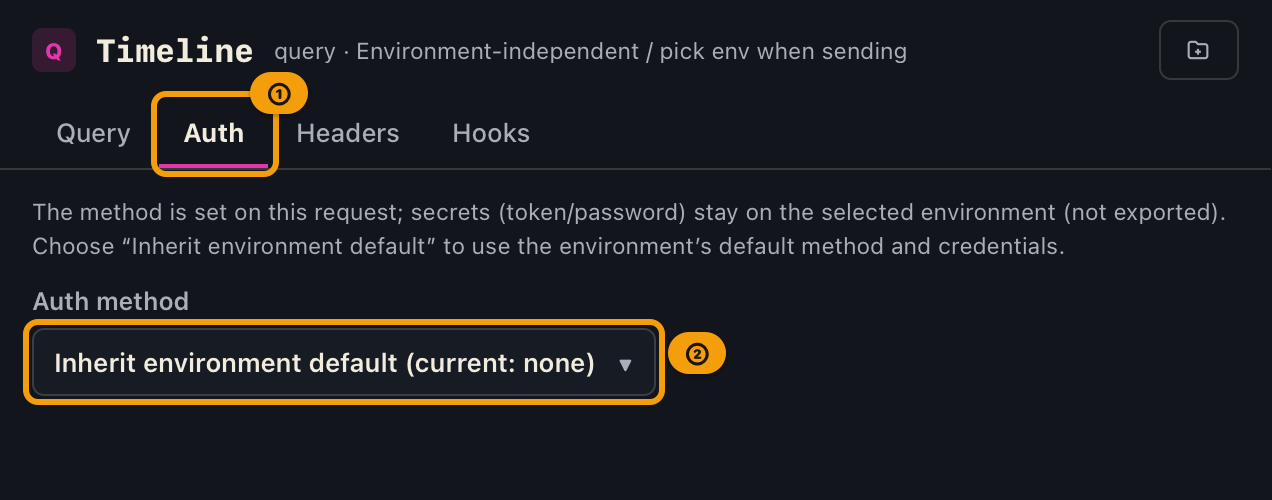
Auth tab (the request's authentication method)
Choose the authentication method on the request pane's Auth tab. Secrets (keys) are saved on the currently selected environment and do not leak into exports.
| Option | Meaning |
|---|---|
| Inherit environment default | Use the selected environment's default method and secrets (the request's default) |
| Bearer | Build Authorization: Bearer … using the environment's Bearer token |
| Basic | Build Authorization: Basic … using the environment's Basic username and password |
"Inherit environment default" shows no key input fields (keys live in the environment editor's "Auth" section). Choosing Bearer / Basic shows a key input field, and the entered value is saved as a secret of the currently selected environment. Choosing Bearer / Basic with no environment selected shows "Select an environment to enter secrets." Warnings such as empty token use the same wording as Registering and switching environments.
Headers tab (auth ON/OFF, request-specific headers, final preview)
At the very top of the request pane's Headers tab is a [✓] Use authentication checkbox.
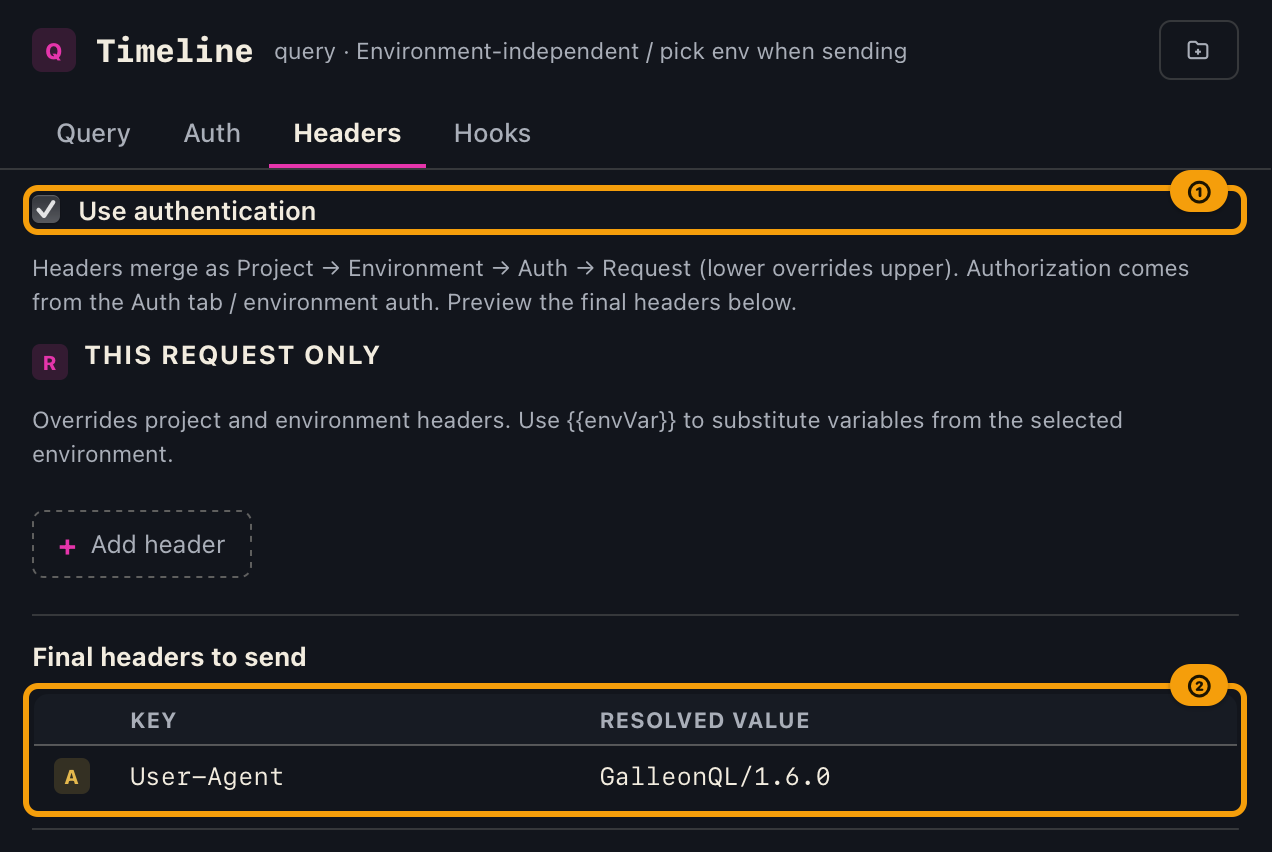
- ON … build the auth header (use the method from the Auth tab).
- OFF … do not attach
Authorization(the method is kept; turning it back ON restores it).
Below that, in the "This request only" section, you can add / edit / delete headers you want to put on this
send only (source R). Enter a header name (e.g. X-Request-Id) and a value, then "Add header". You can
write {{envVar}} in the value (resolved with the currently selected environment). At the bottom, "Final
headers to send" shows the cascaded, variable-resolved result with source badges (see "Header cascade" in
Registering and switching environments).
Below that, an "HTTP timeouts (this query)" section lets you override the connection and total timeout for
this query only. Fields are: Connect timeout (1-60s) and Total timeout (1-600s). Leaving a
field empty inherits the value from the environment, then the project, then the app default (10s connect /
60s total), and the field shows the currently effective value, its source, and the allowed range while
empty (e.g. "Inherited 60 sec (environment) / 1–600 sec"). Full-width digits are normalized to half-width
and saved; any other non-digit character (decimal points, symbols, etc.) is stripped out on the spot with a
"Digits only" notice, and the remaining digits are saved as the number of seconds — so typing 1.5
strips the . and saves 15 seconds, not 1.5. The only error the UI can actually show is an
out-of-range whole number; zero and "unlimited" cannot be set. For setting timeouts at the environment or
project level, see "Setting HTTP timeouts" and "HTTP timeout cascade" in
Registering and switching environments.
Request-specific headers, the auth method, the contents being assembled, the HTTP method, and this query's HTTP timeout override are auto-saved and restored on launch or when switching projects (they are not carried over when switching environments). The response body is not saved, and the Response pane is reset when you switch tabs. This query's HTTP timeout override is not restored from request history — reopen it from a saved collection item if you want to keep it long-term.
2. Choose an HTTP method and press "▶ Send"
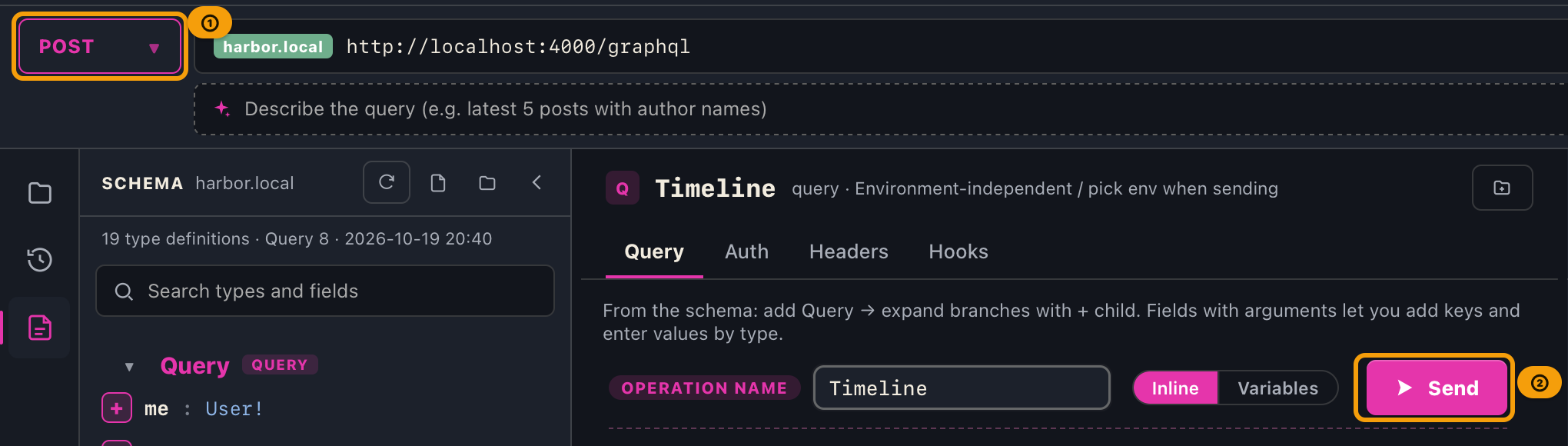
Choose the HTTP method with the method button at the left end of the top bar (default POST).

| Method | How it is sent |
|---|---|
| POST | JSON body { "query": "..." } (in Variables mode, { "query": "...", "variables": {…} }) + Content-Type: application/json |
| GET | No body. The query parameter is URL-encoded and appended to the URL (in Variables mode, &variables=<URL-encoded JSON> is appended as well) |
| UPDATE | The same body as POST (UPDATE isn't a standard HTTP method) |
| DELETE | The same JSON body as POST |
When the Query Builder's input mode is Variables, the generated variables (JSON) are sent along too (in the body
for the POST family, in the &variables= parameter for GET). In Inline mode, only the query body is sent as before
and no variables are attached (see the input mode toggle in Query Builder).
{{environment variables}} written in argument values are resolved to the selected environment's values on send, for
both the query body and variables (sending is not blocked even if unresolved keys remain; you only get a warning). You
can check the resolved content with the PREVIEW's "Final (resolved)" toggle, and the original {{...}} is kept as
is in history and saved data (the {{...}} in headers and the URL are resolved the same way).
When you click ▶ Send, the ▶ turns into a spinning icon, the label changes to Sending..., and the button is
disabled while sending (the header line of the response pane shows the same spinning icon and Sending.... If your
OS is set to reduce motion, such as "Reduce motion" on macOS, the icon stays still instead of spinning). When a
response returns, {status} {elapsed} ms (e.g. 200 1234 ms) appears on the header line of the response pane. Its
color follows the result (green for success, yellow for a partial error, red for a failure). If it fails before
reaching the network, it is Failed · {elapsed} ms. Until you send, the line shows —.
2-2. Subscribe with a subscription
When the operation kind is subscription, GalleonQL connects over the transport you chose for the environment (see "Set the subscription transport and destination" in Environments) — WebSocket (upgrades to a dedicated connection) or SSE (receives the response of a regular HTTP request as an event stream). The HTTP method selector is not used. The destination is the environment's Subscription URL; when that is empty it is derived from the request URL.
Subscriptions are available on the Pro plan only. On the free plan, pressing ▶ Send shows a
"This feature requires the Pro plan" notice and nothing is subscribed (this is the same whether the
transport is WebSocket or SSE). Use "Upgrade to Pro" in that notice to review the plans. The query you
built and any saved queries are kept as they are, so they work as soon as you are on Pro. If you return to
the free plan while subscribed, the subscription ends at that moment; the events you already received stay.
You return to the free plan when you deactivate the license on this device, or when GalleonQL confirms that the
license has expired (it checks at startup, when the expiration date passes while running, and every 6 hours while
running, on Windows, Linux, and macOS alike).
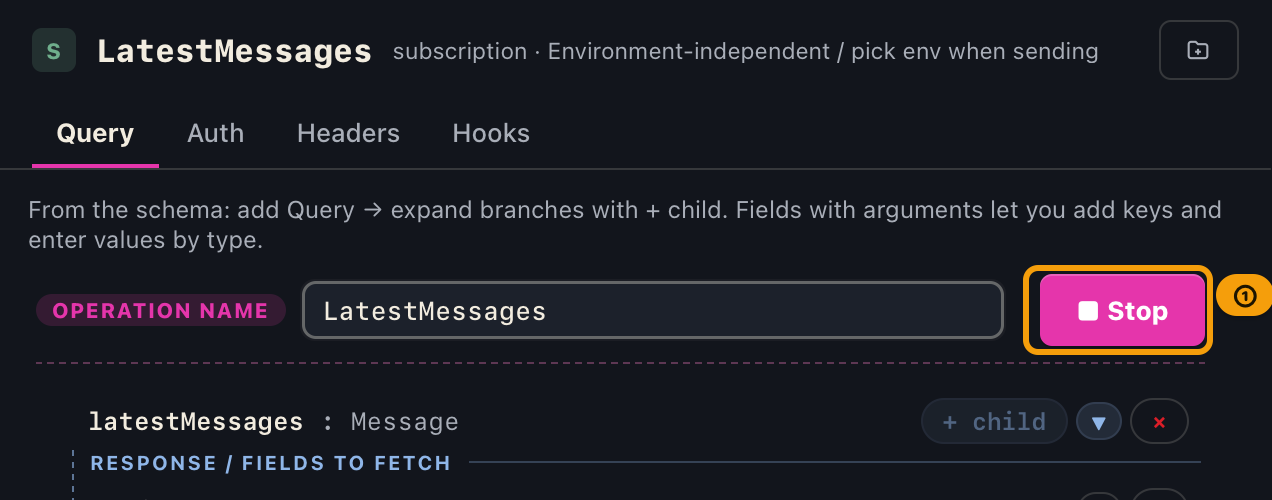
- Press
▶ Sendto start subscribing. The button changes to■ Stop. - Each event the server sends is appended to the event list in the response pane.
- Press
■ Stop, or wait for the server to end the subscription, to finish.
Authentication headers are resolved with the same cascade as sending. With WebSocket they are passed once when the connection opens (a WebSocket handshake cannot carry per-request headers); with SSE they are sent as regular HTTP headers on the single request. Your Auth tab and Headers tab settings still apply either way.
Only one subscription can run at a time, regardless of transport. Starting a new one automatically stops the previous one.
If you use SSE: connecting to an endpoint that does not support SSE fails with a message saying the endpoint may not support SSE. Check that the environment's "Subscription transport" matches what the destination actually supports. Also, depending on the server's implementation, a subscription that ended normally can still show a "Disconnected" red banner (a known limitation that depends on how the server signals the end of a subscription). The events you already received are not affected.
2-3. Read the events you receive
While subscribing, an event list appears on the left of the response pane, and the tabs (Response, Render, and so on) on the right show the selected event. When the response pane is too narrow to fit the list and the event's contents side by side (for example, in a small window), the list is shown above and the contents below (neither is cut off).
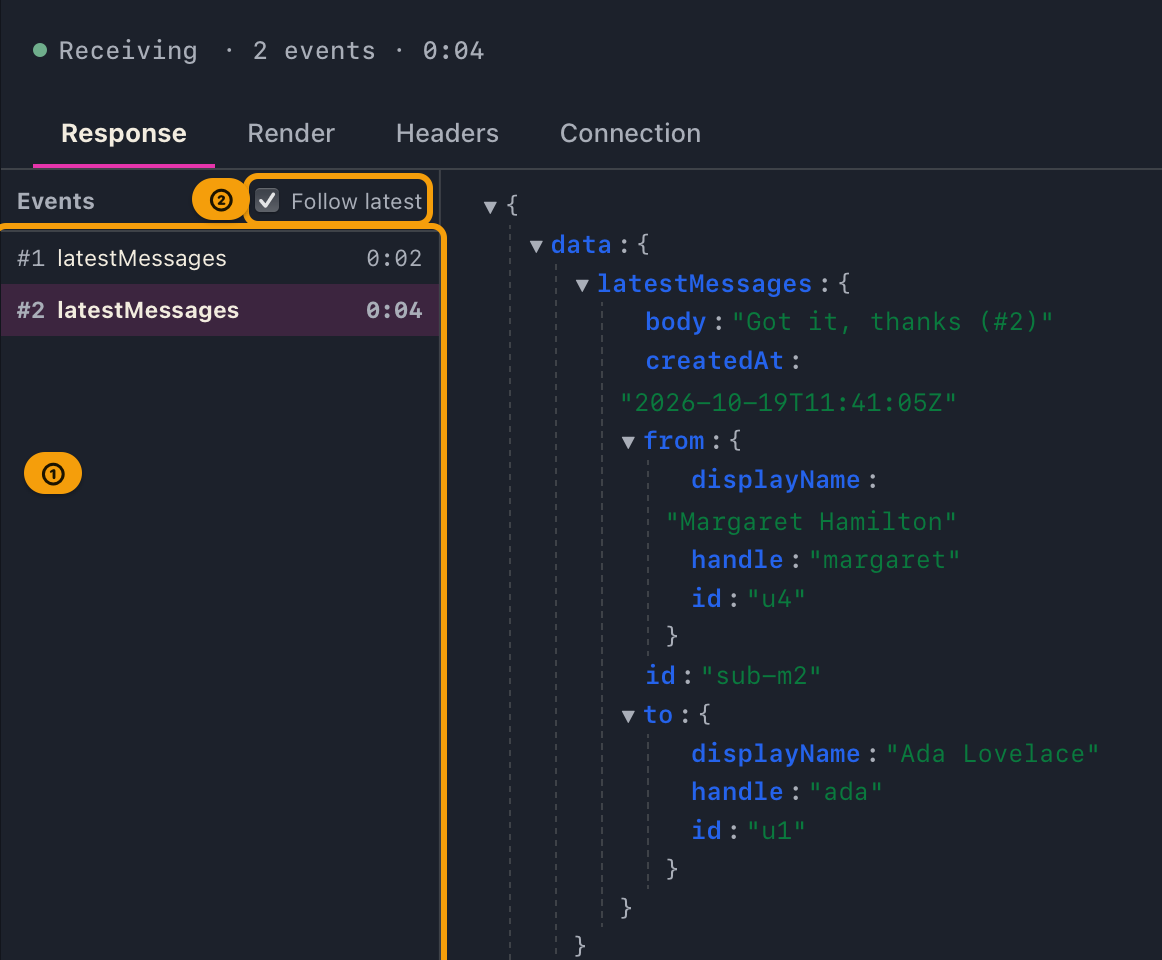
| Location | What it shows |
|---|---|
| Event list (left) | One row per event: #number / label / elapsed. Events containing errors are red and marked ERR |
| Above the list | "Follow latest" toggle (on by default) |
| Below the list | The number of events kept (e.g. 12 / 1000) |
| Header line of the response pane | ● Receiving · N events · elapsed. The ● blinks only while connected, then turns gray. The elapsed time keeps running while no events arrive, and stops when the subscription ends |
| End of the tabs | A Connection tab showing the connection state, destination, transport, total received, and why it ended (SSE also shows the HTTP status and Content-Type) |
- While Follow latest is on, the selection moves to each new event as it arrives. Selecting an older event in the list turns it off automatically so you are not jumped away while reading. Use the toggle to resume following.
- Only the most recent 1000 events are kept. Beyond that the oldest are discarded, and the list shows how many were dropped.
- The subscription continues even when an event contains errors. GraphQL can return partial errors per event, so the error banner appears only while that event is selected.
- If the connection drops, a red banner explains why and the events you already received are kept, so you can see how far it got. No red banner appears when the server ends the subscription normally.
- GalleonQL does not reconnect automatically. Events that occur while disconnected cannot be recovered,
and reconnecting silently would suggest you are seeing everything. Press
▶ Sendagain to resubscribe.
When a subscription ends, one entry is kept in the request history with the number of events received and the elapsed time, and you can reopen the result from that row. A subscription that never ended because you quit the app is not recorded.
3. Review the response
The header line of the response pane (level with the request pane's header) shows the HTTP status and elapsed time
(e.g. 200 1234 ms). The state word (200, Failed, Sending, Receiving, Disconnected, and so on) is never shortened;
when the pane is narrow, the duration, event count, and elapsed time are cut off with "…". Hover over a shortened part
to see the full text in a tooltip. When the window is narrow, the left panel is narrowed first to keep room for the
center panes.
The tab row below it switches how you view the response. The tab row never wraps, and its height never changes. When the tabs don't fit, they move into the menu behind the "»" button (the number beside it is how many tabs are hidden), starting from the last tab. The tab you have selected always stays in the row, and choosing a tab from the menu opens it. With the keyboard, press Enter, Space, or ↓ on "»" to open the menu, choose with ↑ and ↓, and press Enter to open the tab (Esc closes the menu). When hooks apply to this request, open the Response Hooks tab for run results (see Request hooks).
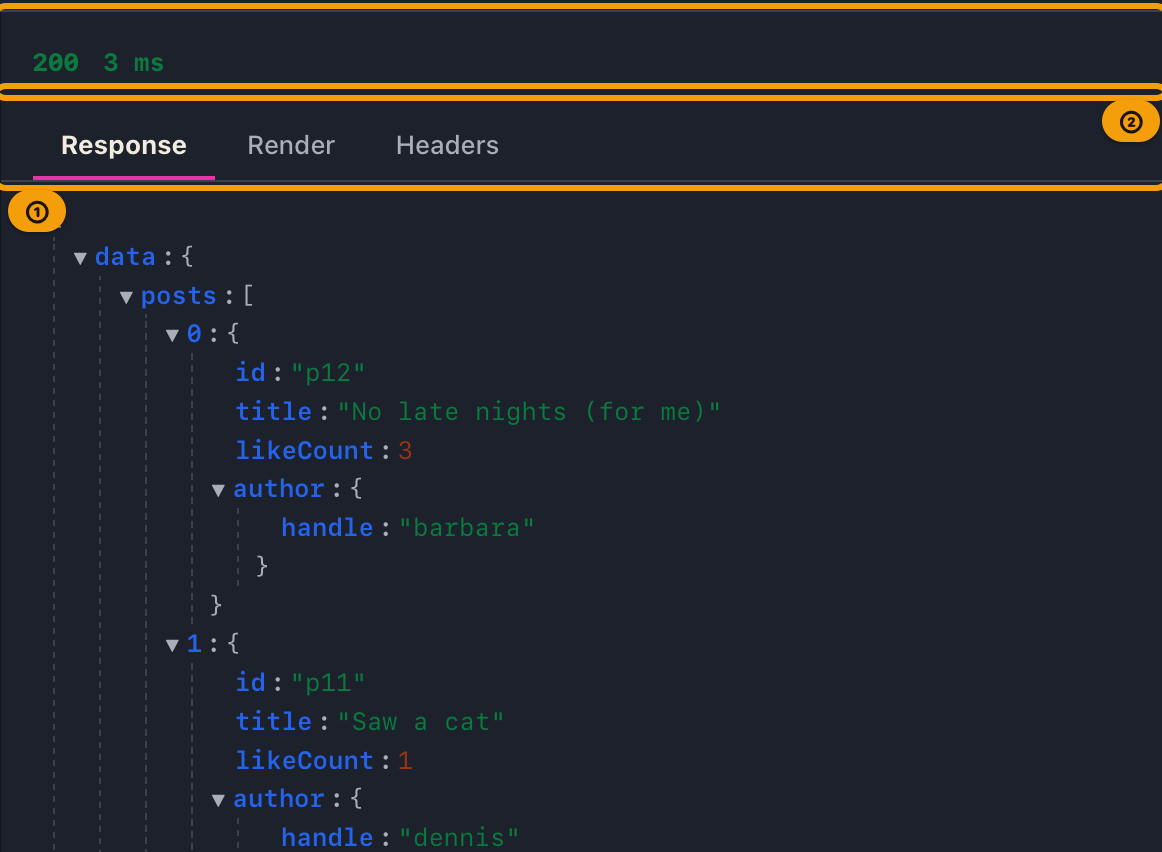
| Tab | Contents |
|---|---|
| Response | A collapsible tree with the body parsed as JSON (fully expanded by default) |
| Render | Pretty-printed body; raw checkbox (top-right) switches to the server original. Copy uses the format on screen |
| Headers | Switch with "Received" and "Sent" at the top of the tab ("Received" by default). Received: every response header (duplicate names and receive order preserved). Sent: the headers actually sent, each shown with a source badge. Names and values are shown in full, never cut off with "…"; long values wrap |
| Hooks | The results of running request hooks (fire, extract, assert). Shown only when at least one hook applies |
| Connection | Details of the subscription's connection. Shown only when you subscribe (see "Read the events you receive" above) |
- The "Response" tab lets you toggle rows with
▼(collapse) /▶(expand). Each new response resets everything to fully expanded. If the body can't be parsed as JSON, a notice explains that it can't be shown as a tree (check the original on the Render tab with raw). - The source badges under "Sent" on the Headers tab are A (App) / P (Project) / E (Environment) / Au (Auth) /
R (Request) / unmarked (the
Content-Typeetc. synthesized on send). When you authenticate with OAuth2, a note also shows where the token came from.
4. Reading errors and partial errors
GraphQL can return errors[] even with HTTP 200. GalleonQL classifies and shows errors by their cause.
A full error (no successful data) is shown in red at the top of the Response as [category] message.
| Category | Main cause |
|---|---|
| Network error | Connection failure, timeout, TLS/DNS, etc. — no HTTP response itself is obtained |
| Auth error | HTTP 401 / 403 |
| Client (query) error | HTTP 400 and other 4xx responses, GraphQL validation or parse failures, or a 2xx/3xx that isn't valid GraphQL |
| Server error | HTTP 5xx, an internal resolver error, a response that cannot be parsed as JSON |
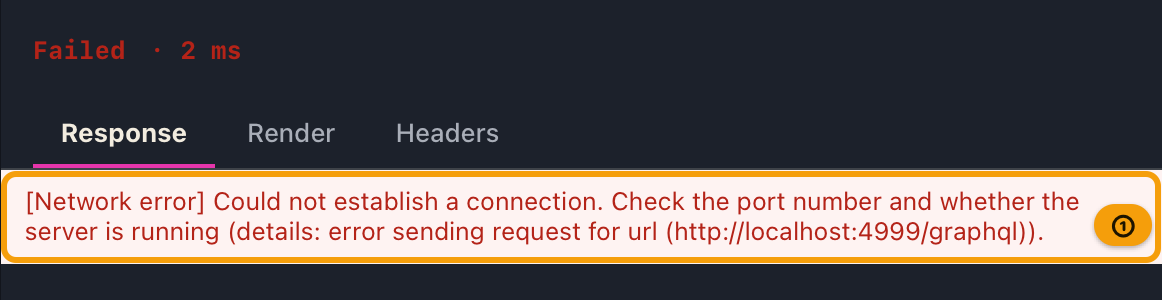
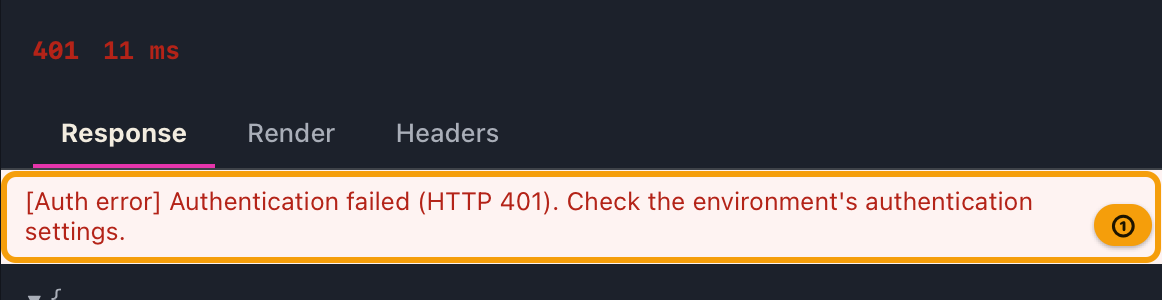
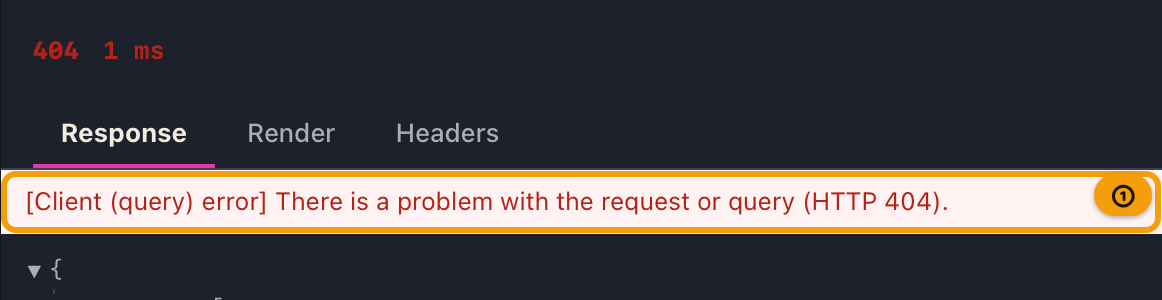
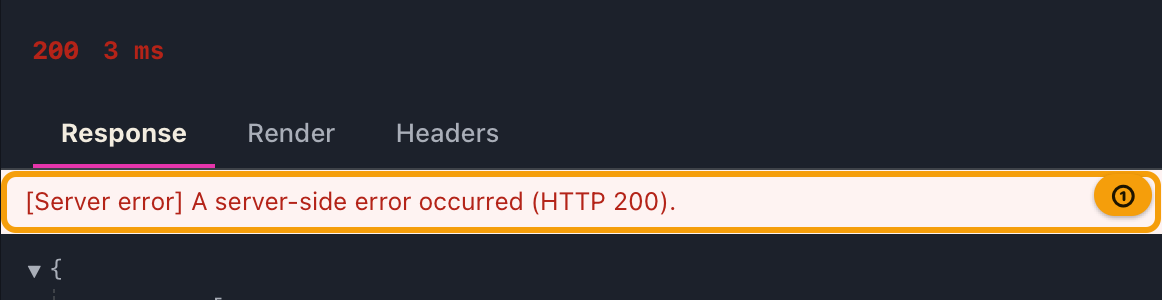
Representative message examples:
| Situation | Message |
|---|---|
| Auth failure | Authentication failed (HTTP {status}). Check the environment's auth settings. |
| A problem with the query | There is a problem with the request or query (HTTP {status}). |
| A server-side problem | A server-side error occurred (HTTP {status}). |
| A 2xx/3xx response that isn't GraphQL | Not a valid GraphQL response. Check the endpoint URL and path. |
| Timeout | The response timed out (no reply within {N}s connect / {M}s total). (defaults are 10s connect / 60s total; if you have changed the settings, the configured values are shown) |
The timeout values can be set by the user (connection: default 10s, 1-60s; total: default 60s, 1-600s; shared with schema import). You can cascade them across the app default, the project, the environment, and this query (four layers) — see "HTTP timeouts (this query)" above and "HTTP timeout cascade" in Registering and switching environments.
A partial error (data and errors coexisting) keeps the data side in the tree, shows "Partial errors
included:" in yellow at the top of the Response, and lists each error message (in the form message (CODE) if
there is an extensions.code).
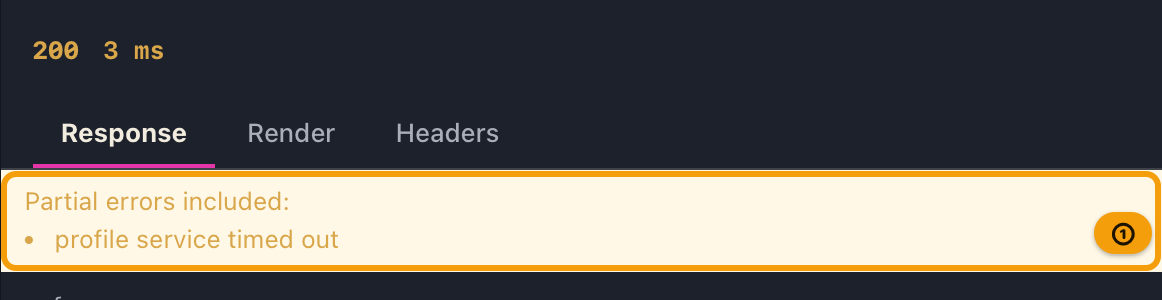
When you cannot send (guards)
When ▶ Send is disabled (dimmed), hovering the cursor outside the button shows the reason in a tooltip (when
multiple apply, the single highest-priority one).
| Priority | Tooltip text | What to do |
|---|---|---|
| 1 | Sending… |
Wait for the previous send to finish |
| 2 | No environment selected |
Add or select an environment (Registering and switching environments) |
| 3 | Endpoint URL is unresolved. Check the environment request URL. |
Fix the environment's request URL and the referenced variables |
| 4 | Query is empty. Add fields with add Query from the schema. |
Add one or more fields using + query |
Sending example
Take the fictional schema type Query { hello: String } as an example.
- Choose the destination environment in the environment selector (the resolved URL is shown in the top bar).
- If authentication is needed, set the method and token in the environment's "Auth" section. The Auth tab can stay on "Inherit environment default".
- Click the
+ queryforhelloin the schema documentation in the schema panel, and confirm the PREVIEW becomesquery MyQuery { hello }. - With the method left as
POST, click▶ Send. - The header line of the response pane shows something like
200 42 ms, with the treedata → hello → "world"on the "Response" tab and pretty body on Render; enable raw to see{"data":{"hello":"world"}}unmodified.
Tips
- The "Final headers to send" preview always matches what's actually sent — both come from the same resolution.
- Request history can be reviewed from the history icon on the left rail (the latest 50 per environment). Clicking a row restores, in a new tab, the query, builder state, request-specific headers, HTTP method, and auth method (excluding secrets). The response body is not saved in the history, and neither is this query's HTTP timeout override — the restored tab inherits the timeout from the environment/project.
- Even if you switch environments while sending, an in-flight response will not overwrite the new state. Send again after switching.
Current limitations
- Sending GraphQL variables follows the input mode. In Inline mode only the query body is sent (POST-family
{ "query": "..." }, GET?query=...); in Variables mode variables are also sent (POST-family body{ "query": "...", "variables": {…} }, GET&variables=<URL-encoded JSON>). For the input mode toggle, see Query Builder. - For a field with required arguments, set values in the Query Builder's argument input before sending. Sending it unset can cause a client (query) error on the server.
- UPDATE is not a standard HTTP method. It fails on servers that do not accept it.
- Authentication is None (none) / Bearer / Basic / OAuth2 Client Credentials (API Key and OAuth2 Authorization Code are not supported).
- Only one subscription can run at a time, GalleonQL does not reconnect automatically after a drop, and only the most recent 1000 events are kept.
When things go wrong
| Symptom | Likely cause | What to do |
|---|---|---|
▶ Send cannot be pressed |
See the guard conditions in "When you cannot send" above | Check the tooltip text, then fix the environment, URL, or query |
[Network error] The response timed out… |
The server is slow, or unreachable | Check the endpoint's availability and the network. For a slow server, extend the total timeout in the project's, environment's, or this query's "HTTP timeouts" section (up to 600s) |
[Auth error] Authentication failed (HTTP 401). … |
HTTP 401 / 403 | Check the environment's "Auth" section and the Auth tab's method. Also check whether Authorization (source Au) appears in the final headers |
[Client (query) error] … (HTTP 400). |
Malformed query, missing required arguments, wrong path, etc. | Check the query in the PREVIEW and the argument input. Also check the URL's path |
[Client (query) error] Not a valid GraphQL response. … |
A 2xx/3xx that is not a GraphQL response | Check the endpoint URL and path (e.g. forgetting to append /graphql) |
[Server error] … |
HTTP 5xx, an internal resolver error, a non-JSON response | Check the server-side logs, and view the original response on the Render tab with raw |
Partial errors included: appears |
Both data and errors are present |
Review the tree's data alongside each error message |
| Nothing shows in the tree | The body is not JSON | View the original response on the Render tab with raw. Check the endpoint or Content-Type |
| UPDATE fails | The server doesn't accept the non-standard UPDATE method |
Switch to POST |
| Subscribing shows "the endpoint may not support SSE" | The environment's transport is SSE, but the destination doesn't support SSE (graphql-sse), or the URL/path is wrong |
Check the destination URL and path. If the endpoint only supports WebSocket, switch the environment's "Subscription transport" to WebSocket |
Related documents
- Assembling queries: Query Builder
- Environment / URL / auth / header cascade: Registering and switching environments
- Pulling values out of responses and checking them: Request hooks (extract and assert)
- The HTTP timeout cascade: the "HTTP timeout cascade" section in Registering and switching environments
- Importing a schema (same error classification and timeouts): Importing a schema
- Terminology: Key terms
- Back to the index: User manual contents