
Request hooks (extract and assert)
How to use declarative post-request rules to extract values into environment variables or assert on status and body values.
Overview
Request hooks run after a query is sent. Two common uses:
- Extract — e.g. pull a token from a
loginmutation response into the environment variabletoken, then referenceBearer {{token}}in headers on later requests. - Assert — e.g. check that the status is
200and$.data.okistrue, and show the results on the Response pane Hooks tab.
A rule is trigger → conditions (AND) → actions. There is no scripting—only form-based declarative rules.
Pro plan only. Free can view rules and keep imported ones, but cannot create, edit, toggle, or run hooks on send. See Plans (Free / Pro) and licenses.
Prerequisites
- You can already send queries (see Sending queries and viewing responses).
- You understand environment variables and the header cascade (see Environments).
- Hooks write environment variables (
{{key}}), not GraphQL variables ($id, etc.). See Glossary.
Where to find it
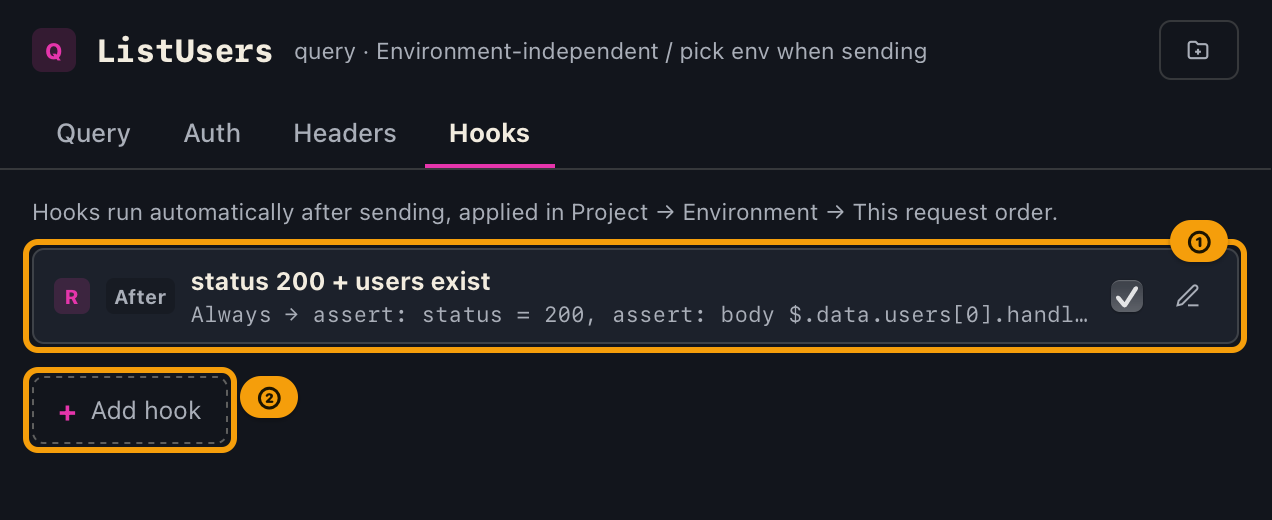
Request pane tabs: Query | Auth | Headers | Hooks. On Free, the tab and panel show a [Pro] badge (hidden while on Pro).
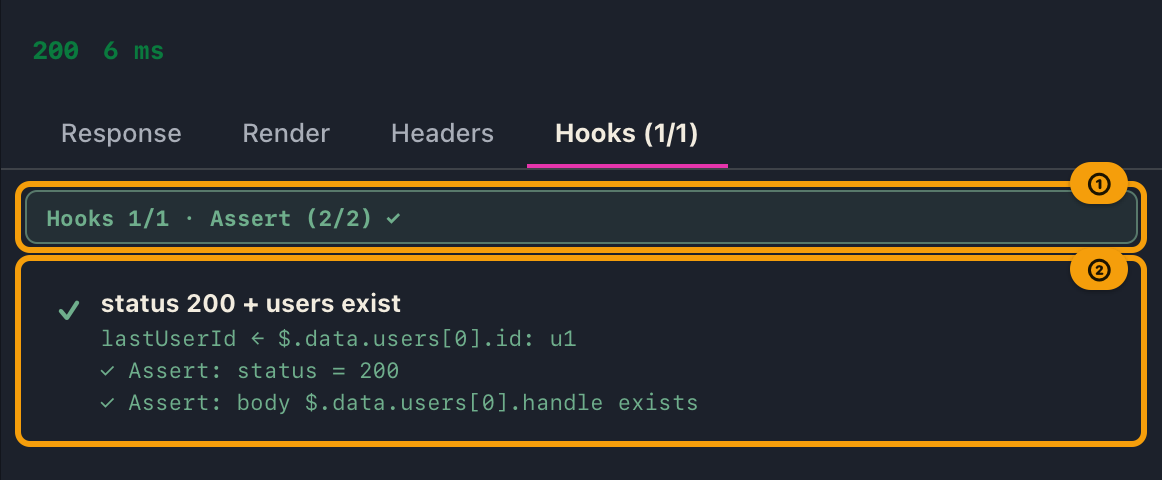
Results appear on the Hooks tab of the response pane (shown only when at least one applicable hook is defined):
- Tab label:
Hooksbefore a run; after send,Hooks (fired/defined)(e.g.Hooks (1/1)) - Tab summary:
Hooks n/m, andAssert (p/t) ✓|△|✗when asserts ran - Detail list: for each hook, a breakdown of whether it fired, its extracts, and its asserts (✓/✗)
- Edit rules on the request pane's Hooks tab as before
Scope (3-layer cascade)
| Scope | Meaning | Badge |
|---|---|---|
| Project | Whole project | P |
| Environment | One chosen environment | E |
| This request | Just this one saved request | R |
- Run order is project → environment → this request.
- For extracts, later scopes win on the same variable name.
- Assertion results are kept per hook (not merged).
- “This request” is unavailable until the request is saved to a collection.
Trigger
| Label | Fires when |
|---|---|
| Success only | Response has data and no errors |
| Include partial errors | Response has both data and errors together (success or partial) |
| Always | Always, including transport failures |
Even with “Always”, body-based conditions, extracts, and asserts do not succeed when there is no response body (transport error).
Conditions (AND)
Zero or more conditions; all must pass (zero conditions means fire whenever the trigger matches).
| Target | Description |
|---|---|
| Status code | The response's HTTP status code |
| Body value | The value at a JSONPath-like path in the response body (e.g. $.data.login.token) |
| Environment variable | The resolved value of an environment variable, at send time |
Operators: = / ≠ / contains / exists / unset (unset is for env vars only).
Actions
| Type | What it does |
|---|---|
| Extract | Reads the value at a body path, and saves it to the chosen environment variable |
| Assert | Check with the same targets/operators as conditions; record pass/fail |
- Only string / number / boolean values can be extracted. Object / array /
nullare skipped. - A failed assert does not block extract in the same rule.
- Assert failures do not change the send outcome display (the status on the response pane's header line, partial errors). They appear on the Response Hooks tab.
How to
Extract a value (token example)
- Open the request, go to Hooks, click Add hook.
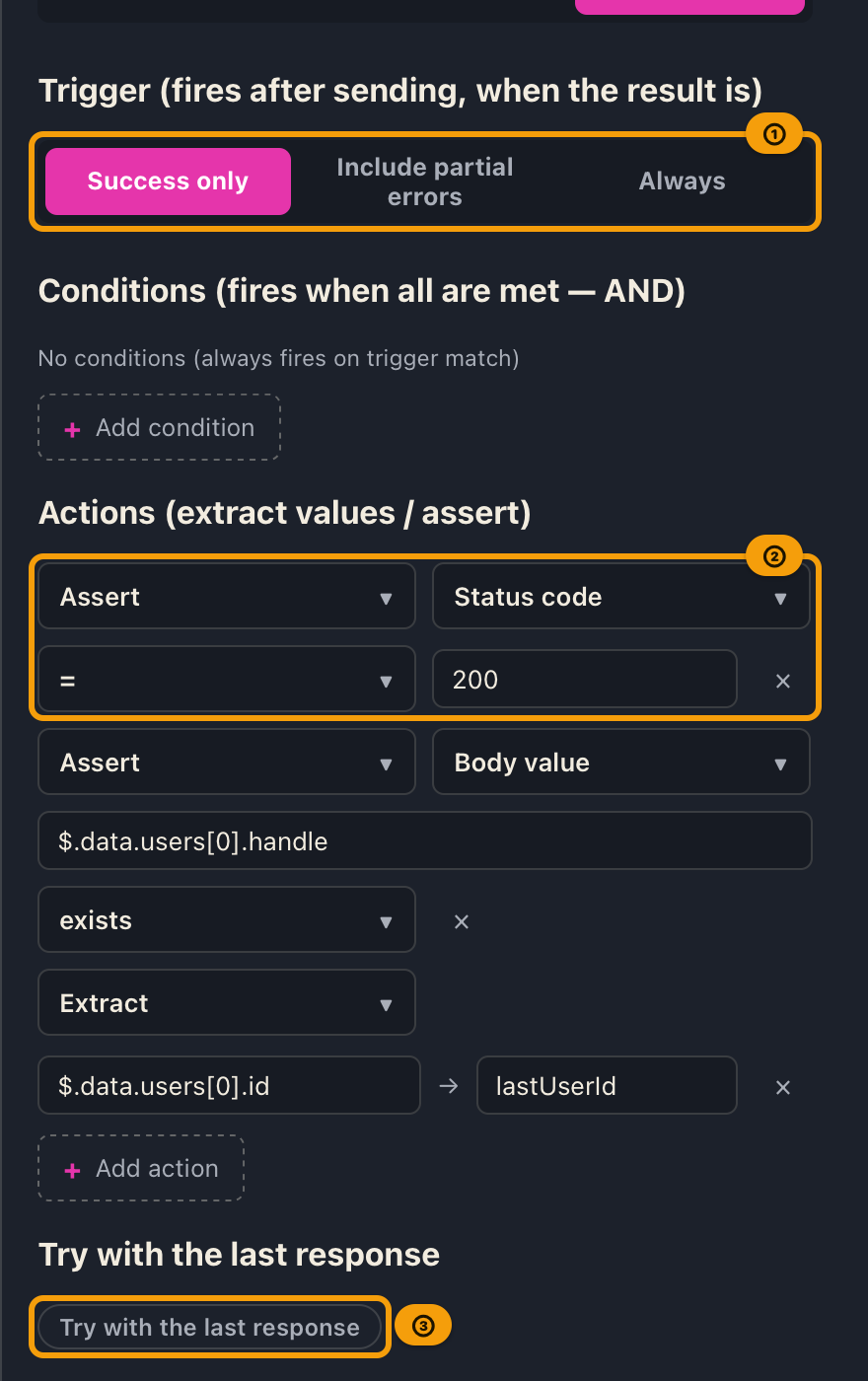
- Choose scope and trigger (often “Success only”).
- Optionally add conditions (e.g. status =
200). - Set action type to Extract, path (e.g.
$.data.login.token), and variable name (e.g.token). - Use Try with the last response (dry-run), then Done.
- On send, matching hooks update the selected environment’s variables.
Add an assertion
- Set the action type to Assert.
- Choose target, operator, and value with the same UI as conditions (e.g. status =
200, body$.data.ok=true). - After dry-run or a real send, open the Response Hooks tab for the summary and each ✓/✗.
- Day to day you can stay on the body tab; open Hooks when setting up rules or when something looks wrong.
Expected results
- The Hooks tab lists the applicable hooks.
- Dry-run does not write env vars and uses the same evaluation as a real send.
- Successful extracts update the selected environment without a confirmation dialog.
- Assert pass/fail appears on the Response Hooks tab; send outcome classification is unchanged.
Limitations
- Pre-request hooks and built-in dynamic variables (
{{$timestamp}}, etc.) are not available yet. - No script hooks or JSON rule editing.
- Hooks are not included in project JSON export/import.
- Unsaved tabs cannot use “This request” scope.
- Empty paths or variable names do not match or extract.
- With the contains operator, an empty comparison value also fails (both conditions and asserts). Allowing
""would makeString.includes("")always true.