
Usage Analytics
Help us improve GalleonQL — sharing anonymous usage data helps us prioritize improvements and bug fixes. This page explains how the usage analytics feature works. It is a separate feature with separate consent from Crash Reporting.
Overview
GalleonQL has a "usage analytics" feature that lets you share anonymous usage information (schema imports, query sends, query builder actions, creating environments or projects, clicking through the purchase flow, and so on) to help us prioritize development. A few things worth knowing:
- It's off by default, and whether to help is always your choice.
- Your GalleonQL data itself — query content, the endpoint URL you connect to, the schema, headers, and environment variable / GraphQL variable values — is never sent.
- It's managed as a separate consent from crash reporting. Toggling one has no effect on the other.
- What's sent is anonymized usage events only. Nothing that identifies you personally or the content of your work is included, it is never sold or shared with third parties, and the data is managed in the EU region.
- The usage information you share helps us decide which features to prioritize improving, so it comes back to you as a more useful GalleonQL. Helping or not makes no difference to which features you can use, and you can change your choice anytime in Settings.
Prerequisites
- The app is running (see Getting started / installing and launching).
Steps
1. The invitation shown on first launch
If you haven't made a choice yet, the following invitation appears right after you launch the app.
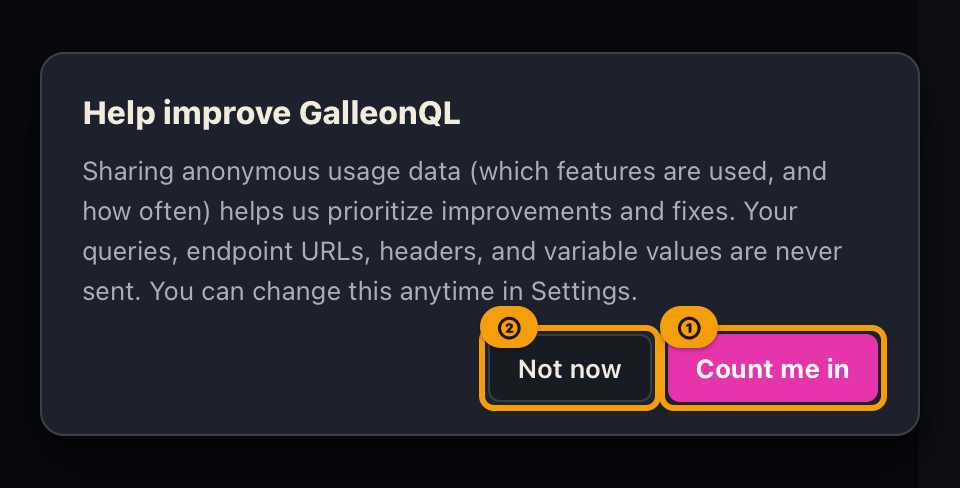
- Heading "Help improve GalleonQL"
- The explanation: "Sharing anonymous usage data (which features are used, and how often) helps us prioritize improvements and fixes. Your queries, endpoint URLs, headers, and variable values are never sent. You can change this anytime in Settings."
- "Count me in" / "Not now" buttons
Choosing "Count me in" means you're helping us out. Choosing "Not now" is fine too — the app works the
same either way. Whichever you choose, this invitation won't appear again. If you change your mind later,
you can switch it anytime in Settings. This invitation does not close with Esc or a click outside it, so please
pick one of the two.
If a crash was just detected, the crash reporting notice may appear first on that launch. In that case, the usage analytics invitation appears after you close the crash reporting notice.
2. Switch it anytime in Settings
- Open Settings (⚙) in the top bar and choose the Privacy tab on the left.
- In the "Usage analytics" section, toggle it on / off. The default is OFF (it sits right below "Crash reporting"). Below the checkbox, you'll see the note: "Sends anonymous usage data to help prioritize feature improvements. Query content, URLs, headers, and environment variable values are never sent. Disabled by default."
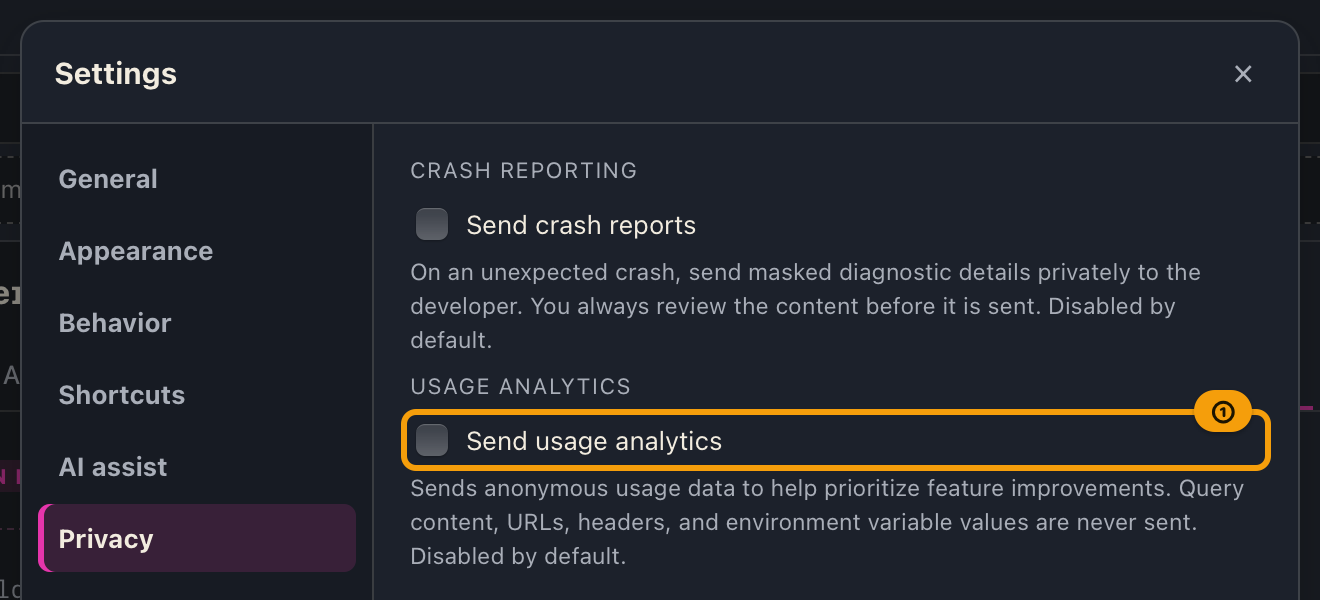
Turning it ON means your subsequent actions are shared anonymously. Turning it back OFF stops all further sharing.
What we ask to share, and what we never send
What may be shared: a predetermined set of usage events — which feature you used, and whether the action succeeded or failed — along with very limited accompanying details (such as an outcome type or a purchase quantity). The app version, OS, and an anonymous device identifier (not tied to you personally) are attached automatically.
What we never send: your GalleonQL data itself — query content, the endpoint URL you connect to, the schema, request or response headers, environment variable values, and GraphQL variable values — is never sent. This is built in at the structural level, so you can help us out with confidence.
Examples
| Situation | Action | Result |
|---|---|---|
| You launch the app for the first time | An invitation to help appears right after launch | Choosing "Count me in" starts anonymous sharing from then on. Choosing "Not now" shares nothing, and this invitation won't appear again |
| You'd rather not help right now | Choose "Not now" in the invitation, or leave "Usage analytics" OFF in Settings | Nothing is shared, even when you send queries or import a schema |
| You change your mind and want to help | Turn "Usage analytics" ON in Settings (⚙) | Sharing starts from that point on (actions before that aren't shared retroactively) |
| You've had it on and want to turn it off | Turn "Usage analytics" OFF in Settings (⚙) | Sharing stops from that point on |
Expected Results
- Usage analytics is disabled by default unless you change the setting.
- Even when you help, your data itself — query content, URLs, headers, and environment variable values — is never shared.
- What's shared is anonymized; nothing that identifies you personally or the content of your work is included.
- It is independent from the crash reporting setting; toggling one has no effect on the other.
Troubleshooting
| Symptom | Likely cause | What to do |
|---|---|---|
| Turning usage analytics ON doesn't seem to change anything on screen | This is expected — it runs in the background, so there's no visible change | Nothing is broken. See "What we ask to share, and what we never send" on this page for what's actually shared |
| The first-launch invitation doesn't appear | You've already made a choice once, or a crash-reporting notice is currently shown (this invitation follows it) | You can switch it at any time via "Usage analytics" in Settings (⚙) |
Related documents
- A separate feature with its own consent: Crash Reporting
- For the app's layout and how to open Settings (⚙), see Getting started / installing and launching
- Term definitions: Key terms
- Manual index: GalleonQL User Manual